Draw your
own stamp
A stamp is your channel's mark in somebody's passport. By default it's a colored box with four letters. Upload a picture and make it your very own!
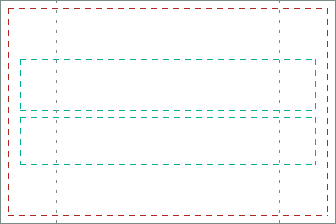
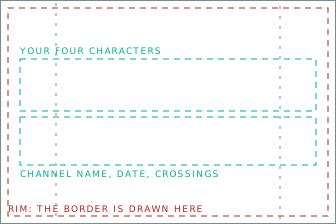
lettersname and date
336 × 224
168 × 112
Use exactly one of those two sizes. Work at 336 unless you have a reason not to.
Some boards shrink your stamp way down. Keep anything important in the center square (the gray guide on the template).
Two ways to use it
The switch beside the upload decides which.
- The picture is the ground. Your letters, channel name, date and crossing count print over it in your stamp color. The dashed guides show where. Keep the middle of your picture simple so it reads.
- The picture is the whole mark. Nothing prints over it, not even the date. Use this one if your design already has its own words.
The guides
| Zone | Box at 336 | What lands there |
|---|---|---|
| Letters | 20, 59 to 316, 111 | Your four characters, large and monospaced. Only with the lettering on. |
| Name and date | 20, 117 to 316, 165 | The channel name, then the date and the crossing count, small. Only with the lettering on. |
| Rim | the outer 8px | Nothing goes over it. The whole canvas is yours. |
| Centre square | 56, 0 to 280, 224 | The part that still reads on the small boards. |
Rules
- PNG or GIF, 336 × 224 or 168 × 112, under 2MB. Twelve pictures per channel, counted with your passport artwork.
- Your picture prints exactly as you made it. Transparent stays transparent. Your stamp color is only used for the lettering.
- GIFs play, just like an animated passport.
- Only the broadcaster can upload one, and only if you've streamed in the last 30 days (or registered in the last 30 if you haven't gone live yet).
- Stamps already given don't change. Your new one goes on the next passport that gets your mark.
Where it shows
Everywhere your mark shows up: passports, holder records, the wall of ports and the arrivals board. The arrivals board uses its own colors instead of yours.